
Exchanging contact details is a common part of professional networking. Traditionally, people have used printed business cards to share their names, job titles, phone numbers, and company information. However, digital communication has introduced another option. Understanding how do digital business cards work can help professionals decide whether electronic contact sharing is suitable for their networking needs.
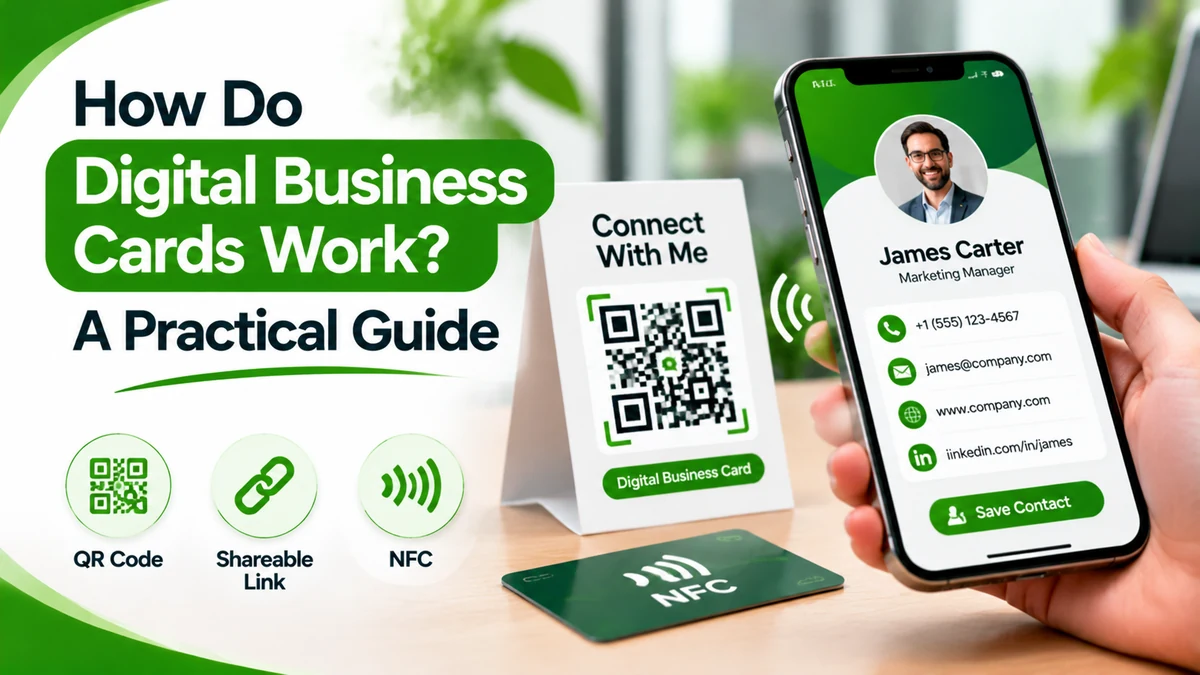
Digital business cards allow individuals and organisations to share professional contact information through a digital format. Depending on the service, users can create a profile, add relevant details, and share it through a QR code, link, or compatible NFC-enabled device.
What Is a Digital Business Card?
A digital business card is an electronic version of a traditional business card.
It typically contains information such as:
Full name and professional title.
Company or organisation.
Email address and phone number.
Website and social media profiles.
Professional photograph or company logo.
Relevant business links.
Some services also allow users to include portfolio links, appointment booking options, and additional contact information.
Unlike printed cards, digital versions can often be updated without creating a completely new batch of materials.
How Do Digital Business Cards Work?
The process generally involves creating a profile, adding contact details, and sharing the information with another person.
Understanding how digital business cards work becomes easier when you look at the main steps.
Step 1: Create a Digital Profile
Users sign up with a digital business card service and enter their professional information.
They can select a layout, add a photograph, include company branding, and choose which contact details they want to display.
Step 2: Generate a Sharing Method
Depending on the service, the digital card may be available through:
A shareable web link.
A QR code.
An NFC-enabled card or device.
An email signature.
A digital wallet or compatible application.
Each option provides a different way to share contact information.
Step 3: Share Contact Details
At a networking event, a professional can display their QR code for another attendee to scan.
Alternatively, they can send a link through email or a messaging application.
Some NFC-enabled products allow users to share their profile by bringing compatible devices close together.
The recipient can then view the available details and save the contact information where supported.
Step 4: Update Information When Needed
One advantage of digital contact profiles is that information can often be edited.
For example, if someone changes their job title, phone number, or company website, they can update their profile through the service.
This reduces the need to print new cards whenever professional details change.
Benefits of Using Digital Business Cards
Digital contact sharing offers several practical advantages.
Convenient Contact Sharing
Professionals can share their details without carrying a large supply of printed cards.
Easier Information Updates
Changes to professional details can be made through the card service, depending on its features.
More Flexible Presentation
Digital profiles can include links to websites, portfolios, social accounts, and other professional resources.
Reduced Printing Requirements
Businesses may reduce their dependence on printed materials, although some professionals still prefer keeping physical cards available.
These features make digital card services useful for professionals who regularly attend conferences, exhibitions, and business meetings.
Digital Business Cards vs Traditional Business Cards
| Feature | Digital business cards | Traditional business cards |
|---|---|---|
| Sharing | QR code, link, or NFC | Physical exchange |
| Updates | Often editable | Requires reprinting |
| Storage | Digital profile or contact | Physical card holder |
| Additional links | Can include clickable links | Usually printed URLs |
| Internet access | May be required for some features | Not required |
| Physical presence | Optional NFC card | Required |
Both formats can serve useful purposes. The right choice depends on professional preferences and the event environment.
How Businesses Can Use Digital Business Cards at Events
Digital contact sharing can simplify interactions at conferences and professional gatherings.
Instead of manually entering details, attendees can scan a code and access a person's professional profile.
A networking app for events can complement this process by helping participants discover attendees, exchange messages, and arrange meetings.
Netwoor AI supports intelligent professional matching, helping event participants identify relevant connections rather than relying only on random introductions.
Security and Privacy Considerations
Digital business card users should consider which information they make publicly available.
Avoid including sensitive personal details that are not necessary for professional communication.
Choose a reputable provider, review its privacy practices, and check whether shared profiles can be edited or restricted.
Businesses should also establish appropriate policies when sharing employee contact information.
Tips for Creating an Effective Digital Business Card
Keep the profile professional and easy to navigate.
Use a clear name, accurate job title, relevant company information, and working contact links.
Avoid adding too much information. The purpose is to make it easy for someone to understand who you are and how to contact you.
Test your QR code and sharing links before attending an event.
Conclusion
Digital business cards provide a flexible way to share professional contact information through links, QR codes, and compatible NFC technology. They can simplify contact exchange, make information updates easier, and support modern networking activities.
For professionals who regularly attend events, digital cards can complement traditional contact-sharing methods and help maintain organised professional relationships.
FAQs
1. Do digital business cards require an app?
Not always. Some services allow recipients to open profiles through a web browser.
2. Can digital business cards work without NFC?
Yes. QR codes and shareable links are common alternatives.
3. Can I save a digital business card to my phone?
Many services support saving contact details to a phone's address book.
4. Are digital business cards free?
Some providers offer free plans, while others charge for additional features.
Get the next article in your inbox
Stay updated with practical insights, product updates, and networking tips — delivered straight to your inbox.